<?xml version="1.0" encoding="utf-8"?><feed xmlns="http://www.w3.org/2005/Atom" xml:lang="en_US"><generator uri="https://jekyllrb.com/" version="4.4.1">Jekyll</generator><link href="https://azure.github.io/feed.xml" rel="self" type="application/atom+xml" /><link href="https://azure.github.io/" rel="alternate" type="text/html" hreflang="en_US" /><updated>2026-11-24T00:47:18+00:00</updated><id>https://azure.github.io/feed.xml</id><title type="html">Azure App Service</title><subtitle>Announcements, updates, and release notes from the Azure App Service product team.</subtitle><author><name>Azure App Service</name></author><entry><title type="html">Modernize more applications with Managed Instance on Azure App Service</title><link href="https://azure.github.io/2027/11/17/Modernize-more-applications-with-managed-instance-on-app-service.html" rel="alternate" type="text/html" title="Modernize more applications with Managed Instance on Azure App Service" /><published>2027-11-17T00:00:00+00:00</published><updated>2027-11-17T00:00:00+00:00</updated><id>https://azure.github.io/2027/11/17/Modernize-more-applications-with-managed-instance-on-app-service</id><content type="html" xml:base="https://azure.github.io/2027/11/17/Modernize-more-applications-with-managed-instance-on-app-service.html"><![CDATA[<h1 id="modernize-more-windows-applications-with-managed-instance-on-azure-app-service">Modernize more Windows applications with Managed Instance on Azure App Service</h1>

<p><em>What’s new since general availability: Azure Catalyst support, Premium v3 hosting, and Isolated v4 for App Service Environment.</em></p>

<p>For many organizations, the hardest part of modernizing a Windows web application isn’t moving the code. It’s understanding the dependencies that tie the application to its current server: installed components, registry settings, Windows services, network shares, and other operating system configuration.</p>

<p>Since <strong><a href="https://techcommunity.microsoft.com/blog/appsonazureblog/announcing-general-availability-of-managed-instance-on-azure-app-service/4541283">Managed Instance on Azure App Service became generally available in August 2026</a></strong>, we’ve continued investing in ways to make these migrations easier to discover, assess, and execute. At Microsoft Ignite 2026, we’re highlighting three updates: <strong>Azure Catalyst support</strong>, <strong>Premium v3 availability</strong>, and <strong>Isolated v4 support</strong>.</p>

<p>Together, they make Managed Instance easier to include in portfolio-scale modernization plans and give customers more flexibility in choosing where to host eligible applications.</p>

<h2 id="start-with-discovery-azure-catalyst-support-for-managed-instance">Start with discovery: Azure Catalyst support for Managed Instance</h2>

<p>Modernization begins with understanding which applications you have and which Azure destination fits their requirements. Applications with Windows-specific dependencies may have been ruled out for conventional App Service migrations, leaving teams to choose between extensive rewrites and continuing to manage virtual machines.</p>

<p><strong>Azure Catalyst support for Managed Instance</strong> helps bring this hosting option into migration discovery and assessment workflows. Teams can revisit Windows web applications that were previously considered unsuitable for standard App Service hosting, assess their dependencies, and evaluate whether Managed Instance is an appropriate destination.</p>

<p>This supports a more repeatable modernization approach:</p>

<ol>
  <li><strong>Discover</strong> Windows application workloads across the estate.</li>
  <li><strong>Assess</strong> application and infrastructure dependencies, using Azure Catalyst and available assessment tooling.</li>
  <li><strong>Identify candidates</strong> whose requirements align with Managed Instance capabilities.</li>
  <li><strong>Validate</strong> one representative application in a non-production environment.</li>
  <li><strong>Expand</strong> from a proven migration pattern to a wider application portfolio.</li>
</ol>

<p>Azure Catalyst assessment informs the decision; it does not guarantee compatibility or eliminate the need to test installation scripts, networking, configuration, and application behavior. Managed Instance also complements Azure Catalyst in GitHub Copilot modernization for .NET, which can help teams assess, remediate, validate, and deploy suitable applications.</p>

<h2 id="more-hosting-flexibility-premium-v3-availability">More hosting flexibility: Premium v3 availability</h2>

<p>Managed Instance initially emphasized Premium v4 hosting. We’re expanding the options with support for <strong>Premium v3 and Premium v3 memory-optimized plans</strong> in enabled regions.</p>

<p>This gives customers an additional path where Premium v4 regional capacity or availability would otherwise constrain a modernization project. It also allows teams to consider a broader set of App Service compute options when balancing workload needs, capacity, and cost.</p>

<p>Premium v3 availability is being enabled across eligible App Service infrastructure over time. <strong>Confirm Managed Instance eligibility for the exact region and plan before committing to a migration schedule.</strong> Availability should not be assumed for every Premium v3 stamp or region at launch.</p>

<h2 id="dedicated-hosting-isolated-v4-support">Dedicated hosting: Isolated v4 support</h2>

<p>We’re also expanding Managed Instance to <strong>Isolated v4 App Service plans in App Service Environment v3</strong>.</p>

<p>This brings Managed Instance capabilities to a <strong>single-tenant App Service hosting environment</strong> for organizations whose architecture calls for dedicated hosting and network isolation. It offers another modernization option for eligible Windows web applications with installed components, operating system customization, or other supported dependencies.</p>

<p>Isolated v4 expands the choice of hosting environment; it does not mean arbitrary server administration or that every Windows workload is supported. Customers should validate Managed Instance feature boundaries, region support, networking, and application dependencies before migration.</p>

<h2 id="why-managed-instance-matters">Why Managed Instance matters</h2>

<p>Managed Instance on Azure App Service is designed for Windows web applications that need more operating system customization than conventional App Service hosting offers, while retaining managed platform benefits such as patching, scaling, diagnostics, and identity integration.</p>

<p>Capabilities include:</p>

<ul>
  <li><strong>Configuration scripts</strong> for supported installers, components, Windows features, and services.</li>
  <li><strong>Registry adapters</strong> for supported application configuration.</li>
  <li><strong>Storage mounts</strong> for required file-share and drive-letter scenarios.</li>
  <li><strong>Secure RDP through Azure Bastion</strong> for diagnostics and familiar Windows tools.</li>
  <li><strong>Managed identity and Azure Key Vault integration</strong> for securely accessing supported resources and secrets.</li>
</ul>

<p>Managed Instance is intended for eligible <strong>Windows web applications</strong>. It is not a Linux or container hosting option, nor a replacement for a fully customizable Windows virtual machine.</p>

<h2 id="from-one-application-to-a-modernization-portfolio">From one application to a modernization portfolio</h2>

<p>These updates connect the key stages of modernization:</p>

<ul>
  <li><strong>Discover and assess:</strong> Use Azure Catalyst and application assessment tools to identify candidates.</li>
  <li><strong>Modernize where needed:</strong> Use Azure Catalyst in GitHub Copilot modernization for .NET and targeted changes to address compatibility gaps.</li>
  <li><strong>Choose the hosting model:</strong> Evaluate Managed Instance on Premium v3, Premium v4, or Isolated v4, subject to region and plan support.</li>
  <li><strong>Migrate and operate:</strong> Validate dependencies and deploy to App Service with managed operational capabilities.</li>
</ul>

<p>A practical first step is to revisit one Windows web application previously excluded from App Service because of its dependencies. Assess it, validate its fit, and use the lessons learned to inform a repeatable approach for similar applications.</p>

<h2 id="get-started">Get started</h2>

<ul>
  <li><a href="https://aka.ms/managedinstanceonappservicequickstart">Managed Instance quickstart</a></li>
  <li><a href="https://go.microsoft.com/fwlink/?linkid=2347057">Managed Instance configuration documentation</a></li>
  <li><a href="https://aka.ms/managedinstanceonappservicesamples">Managed Instance samples and configuration scripts</a></li>
  <li><a href="https://learn.microsoft.com/azure/app-service/overview-managed-instance">Managed Instance overview on Microsoft Learn</a></li>
</ul>

<p><strong>Revisit applications that previously seemed too complex for App Service. With Azure Catalyst support and more hosting choices, Managed Instance can help you move more of your Windows application portfolio to a managed platform with fewer changes.</strong></p>]]></content><author><name>Azure App Service</name></author><summary type="html"><![CDATA[Modernize more Windows applications with Managed Instance on Azure App Service What’s new since general availability: Azure Catalyst support, Premium v3 hosting, and Isolated v4 for App Service Environment. For many organizations, the hardest part of modernizing a Windows web application isn’t moving the code. It’s understanding the dependencies that tie the application to its current server: installed components, registry settings, Windows services, network shares, and other operating system configuration. Since Managed Instance on Azure App Service became generally available in August 2026, we’ve continued investing in ways to make these migrations easier to discover, assess, and execute. At Microsoft Ignite 2026, we’re highlighting three updates: Azure Catalyst support, Premium v3 availability, and Isolated v4 support. Together, they make Managed Instance easier to include in portfolio-scale modernization plans and give customers more flexibility in choosing where to host eligible applications. Start with discovery: Azure Catalyst support for Managed Instance Modernization begins with understanding which applications you have and which Azure destination fits their requirements. Applications with Windows-specific dependencies may have been ruled out for conventional App Service migrations, leaving teams to choose between extensive rewrites and continuing to manage virtual machines. Azure Catalyst support for Managed Instance helps bring this hosting option into migration discovery and assessment workflows. Teams can revisit Windows web applications that were previously considered unsuitable for standard App Service hosting, assess their dependencies, and evaluate whether Managed Instance is an appropriate destination. This supports a more repeatable modernization approach: Discover Windows application workloads across the estate. Assess application and infrastructure dependencies, using Azure Catalyst and available assessment tooling. Identify candidates whose requirements align with Managed Instance capabilities. Validate one representative application in a non-production environment. Expand from a proven migration pattern to a wider application portfolio. Azure Catalyst assessment informs the decision; it does not guarantee compatibility or eliminate the need to test installation scripts, networking, configuration, and application behavior. Managed Instance also complements Azure Catalyst in GitHub Copilot modernization for .NET, which can help teams assess, remediate, validate, and deploy suitable applications. More hosting flexibility: Premium v3 availability Managed Instance initially emphasized Premium v4 hosting. We’re expanding the options with support for Premium v3 and Premium v3 memory-optimized plans in enabled regions. This gives customers an additional path where Premium v4 regional capacity or availability would otherwise constrain a modernization project. It also allows teams to consider a broader set of App Service compute options when balancing workload needs, capacity, and cost. Premium v3 availability is being enabled across eligible App Service infrastructure over time. Confirm Managed Instance eligibility for the exact region and plan before committing to a migration schedule. Availability should not be assumed for every Premium v3 stamp or region at launch. Dedicated hosting: Isolated v4 support We’re also expanding Managed Instance to Isolated v4 App Service plans in App Service Environment v3. This brings Managed Instance capabilities to a single-tenant App Service hosting environment for organizations whose architecture calls for dedicated hosting and network isolation. It offers another modernization option for eligible Windows web applications with installed components, operating system customization, or other supported dependencies. Isolated v4 expands the choice of hosting environment; it does not mean arbitrary server administration or that every Windows workload is supported. Customers should validate Managed Instance feature boundaries, region support, networking, and application dependencies before migration. Why Managed Instance matters Managed Instance on Azure App Service is designed for Windows web applications that need more operating system customization than conventional App Service hosting offers, while retaining managed platform benefits such as patching, scaling, diagnostics, and identity integration. Capabilities include: Configuration scripts for supported installers, components, Windows features, and services. Registry adapters for supported application configuration. Storage mounts for required file-share and drive-letter scenarios. Secure RDP through Azure Bastion for diagnostics and familiar Windows tools. Managed identity and Azure Key Vault integration for securely accessing supported resources and secrets. Managed Instance is intended for eligible Windows web applications. It is not a Linux or container hosting option, nor a replacement for a fully customizable Windows virtual machine. From one application to a modernization portfolio These updates connect the key stages of modernization: Discover and assess: Use Azure Catalyst and application assessment tools to identify candidates. Modernize where needed: Use Azure Catalyst in GitHub Copilot modernization for .NET and targeted changes to address compatibility gaps. Choose the hosting model: Evaluate Managed Instance on Premium v3, Premium v4, or Isolated v4, subject to region and plan support. Migrate and operate: Validate dependencies and deploy to App Service with managed operational capabilities. A practical first step is to revisit one Windows web application previously excluded from App Service because of its dependencies. Assess it, validate its fit, and use the lessons learned to inform a repeatable approach for similar applications. Get started Managed Instance quickstart Managed Instance configuration documentation Managed Instance samples and configuration scripts Managed Instance overview on Microsoft Learn Revisit applications that previously seemed too complex for App Service. With Azure Catalyst support and more hosting choices, Managed Instance can help you move more of your Windows application portfolio to a managed platform with fewer changes.]]></summary></entry><entry><title type="html">What’s new for Azure App Service blogging</title><link href="https://azure.github.io/2027/11/09/fawad-demo-blog-post.html" rel="alternate" type="text/html" title="What’s new for Azure App Service blogging" /><published>2027-11-09T00:00:00+00:00</published><updated>2027-11-09T00:00:00+00:00</updated><id>https://azure.github.io/2027/11/09/fawad-demo-blog-post</id><content type="html" xml:base="https://azure.github.io/2027/11/09/fawad-demo-blog-post.html"><![CDATA[<p><a href="https://learn.microsoft.com/cli/azure/release-notes-azure-cli#april-07-2026">Azure CLI 2.85.0</a> adds control over Linux runtime patch adoption, default hostname generation, and automatic scaling configuration for Azure App Service. It also gives automation owners advance warning of an upcoming breaking change to <code class="language-plaintext highlighter-rouge">az webapp list-runtimes</code>.</p>

<h2 id="test-post-please-ignore---control-when-linux-runtime-patches-reach-your-app">TEST POST PLEASE IGNORE - Control when Linux runtime patches reach your app</h2>

<p>The new <code class="language-plaintext highlighter-rouge">--platform-release-channel</code> option for <code class="language-plaintext highlighter-rouge">az webapp update</code> lets you choose how quickly an App Service for Linux app adopts runtime patches:</p>

<ul>
  <li><code class="language-plaintext highlighter-rouge">Latest</code> receives patches first and is intended for early validation.</li>
  <li><code class="language-plaintext highlighter-rouge">Standard</code> is the default and follows the normal rollout cadence.</li>
  <li><code class="language-plaintext highlighter-rouge">Extended</code> stays further behind to provide more validation time.</li>
</ul>

<p>For example, move an app to the Extended channel:</p>

<div class="language-bash highlighter-rouge"><div class="highlight"><pre class="highlight"><code>az webapp update <span class="se">\</span>
  <span class="nt">--resource-group</span> &lt;resource-group&gt; <span class="se">\</span>
  <span class="nt">--name</span> &lt;web-app&gt; <span class="se">\</span>
  <span class="nt">--platform-release-channel</span> Extended
</code></pre></div></div>

<p>The option also supports deployment slots. Release channels control when an app adopts platform runtime patches; they do not change the runtime family configured for the app.</p>

<h2 id="choose-the-scope-for-a-generated-default-hostname">Choose the scope for a generated default hostname</h2>

<p><code class="language-plaintext highlighter-rouge">az webapp up</code> now supports <code class="language-plaintext highlighter-rouge">--domain-name-scope</code>, which controls the scope used to generate a unique default hostname during resource creation.</p>

<div class="language-bash highlighter-rouge"><div class="highlight"><pre class="highlight"><code>az webapp up <span class="se">\</span>
  <span class="nt">--resource-group</span> &lt;resource-group&gt; <span class="se">\</span>
  <span class="nt">--plan</span> &lt;app-service-plan&gt; <span class="se">\</span>
  <span class="nt">--name</span> &lt;web-app&gt; <span class="se">\</span>
  <span class="nt">--domain-name-scope</span> TenantReuse
</code></pre></div></div>

<p>The generated hostname can include the app name, a unique string, and the Azure region instead of relying only on <code class="language-plaintext highlighter-rouge">&lt;app-name&gt;.azurewebsites.net</code>. Supported scopes include tenant, subscription, resource group, and no-reuse behavior.</p>

<h2 id="use-automatic-scaling-options-without-preview-warnings">Use automatic scaling options without preview warnings</h2>

<p>Azure CLI no longer marks the App Service automatic scaling options as preview. Enable automatic scaling and set the plan’s maximum burst capacity with:</p>

<div class="language-bash highlighter-rouge"><div class="highlight"><pre class="highlight"><code>az appservice plan update <span class="se">\</span>
  <span class="nt">--resource-group</span> &lt;resource-group&gt; <span class="se">\</span>
  <span class="nt">--name</span> &lt;app-service-plan&gt; <span class="se">\</span>
  <span class="nt">--elastic-scale</span> <span class="nb">true</span> <span class="se">\</span>
  <span class="nt">--max-elastic-worker-count</span> &lt;maximum-instances&gt;
</code></pre></div></div>

<p>You can also configure the minimum and prewarmed instance counts for a web app:</p>

<div class="language-bash highlighter-rouge"><div class="highlight"><pre class="highlight"><code>az webapp update <span class="se">\</span>
  <span class="nt">--resource-group</span> &lt;resource-group&gt; <span class="se">\</span>
  <span class="nt">--name</span> &lt;web-app&gt; <span class="se">\</span>
  <span class="nt">--minimum-elastic-instance-count</span> &lt;minimum-instances&gt; <span class="se">\</span>
  <span class="nt">--prewarmed-instance-count</span> &lt;prewarmed-instances&gt;
</code></pre></div></div>

<p>The App Service plan must support automatic scaling. The CLI accepts Premium V2 and Premium V3 plans for this configuration.</p>

<h2 id="prepare-for-changes-to-az-webapp-list-runtimes">Prepare for changes to az webapp list-runtimes</h2>

<p>Azure CLI 2.85.0 begins warning about a future breaking change to <code class="language-plaintext highlighter-rouge">az webapp list-runtimes</code>. The command still returns its existing flat list in this release, but a later breaking-change release will return structured objects with these fields:</p>

<ul>
  <li><code class="language-plaintext highlighter-rouge">os</code></li>
  <li><code class="language-plaintext highlighter-rouge">runtime</code></li>
  <li><code class="language-plaintext highlighter-rouge">version</code></li>
  <li><code class="language-plaintext highlighter-rouge">config</code></li>
  <li><code class="language-plaintext highlighter-rouge">support</code></li>
  <li><code class="language-plaintext highlighter-rouge">end_of_life</code></li>
</ul>

<p>The <code class="language-plaintext highlighter-rouge">--linux</code> option will be replaced by <code class="language-plaintext highlighter-rouge">--os-type</code>, and <code class="language-plaintext highlighter-rouge">--show-runtime-details</code> will be removed because the structured output includes those details. Update scripts that parse the current string list before adopting the breaking-change release.</p>

<h2 id="get-the-release">Get the release</h2>

<p>Run <code class="language-plaintext highlighter-rouge">az upgrade</code> to install the latest available Azure CLI release, then verify the installed version:</p>

<div class="language-bash highlighter-rouge"><div class="highlight"><pre class="highlight"><code>az upgrade
az version
</code></pre></div></div>]]></content><author><name>Azure App Service</name></author><summary type="html"><![CDATA[Azure CLI 2.85.0 adds control over Linux runtime patch adoption, default hostname generation, and automatic scaling configuration for Azure App Service. It also gives automation owners advance warning of an upcoming breaking change to az webapp list-runtimes.]]></summary></entry><entry><title type="html">PHP Security Updates on Azure App Service for Linux</title><link href="https://azure.github.io/2026/11/19/php-security-release-app-service-linux.html" rel="alternate" type="text/html" title="PHP Security Updates on Azure App Service for Linux" /><published>2026-11-19T00:00:00+00:00</published><updated>2026-11-19T00:00:00+00:00</updated><id>https://azure.github.io/2026/11/19/php-security-release-app-service-linux</id><content type="html" xml:base="https://azure.github.io/2026/11/19/php-security-release-app-service-linux.html"><![CDATA[<blockquote>
  <p><strong>Update (19 November 2026):</strong> The rollout of updated built-in PHP images for Azure App Service on Linux has started. We expect it to complete by <strong>noon on 20 November 2026 (PT)</strong>.</p>
</blockquote>

<p>The PHP project published security releases on <strong>19 November 2026</strong> for supported PHP release lines. The Azure App Service platform itself is <strong>not affected</strong> by these PHP vulnerabilities. Applications running PHP may need the updated runtime.</p>

<h2 id="what-the-updates-address">What the updates address</h2>

<p>The PHP security releases address vulnerabilities in PHP. The PHP security team noted that the highest-severity issues require non-default configurations or uncommon setups. Review the PHP release announcements and change logs for details relevant to your PHP version and application.</p>

<h2 id="patched-php-versions">Patched PHP versions</h2>

<p>The PHP project recommends upgrading to the following security releases:</p>

<table>
  <thead>
    <tr>
      <th>PHP release line</th>
      <th>Patched version</th>
      <th>Official release notes</th>
    </tr>
  </thead>
  <tbody>
    <tr>
      <td>PHP 8.5</td>
      <td><strong>8.5.13</strong></td>
      <td><a href="https://www.php.net/releases/8_5_13.php">PHP 8.5.13</a></td>
    </tr>
    <tr>
      <td>PHP 8.4</td>
      <td><strong>8.4.28</strong></td>
      <td><a href="https://www.php.net/releases/8_4_28.php">PHP 8.4.28</a></td>
    </tr>
    <tr>
      <td>PHP 8.3</td>
      <td><strong>8.3.37</strong></td>
      <td><a href="https://www.php.net/releases/8_3_37.php">PHP 8.3.37</a></td>
    </tr>
    <tr>
      <td>PHP 8.2</td>
      <td><strong>8.2.36</strong></td>
      <td><a href="https://www.php.net/releases/8_2_36.php">PHP 8.2.36</a></td>
    </tr>
  </tbody>
</table>

<h2 id="what-we-are-doing">What we are doing</h2>

<p>Azure App Service has started rolling out updated built-in PHP images for Linux. The rollout is expected to complete by noon on <strong>20 November 2026 (PT)</strong>.</p>

<h2 id="what-you-should-do">What you should do</h2>

<ol>
  <li><strong>If you use a supported built-in PHP runtime on App Service for Linux, the updated image will be rolled out to your app automatically.</strong> End-of-life PHP runtimes will not receive these patches; update and test your app on a <a href="https://www.php.net/supported-versions.php">supported PHP version</a>, then configure your app to use that version.</li>
  <li><strong>Verify the PHP version used by your running application after the rollout.</strong> If it reports the patched version for your release line, no further action is needed for this update.</li>
  <li><strong>Update custom containers and bring-your-own PHP runtimes yourself.</strong> Rebuild or update them with a patched PHP release, then test and redeploy.</li>
  <li><strong>Review the PHP release notes</strong> for the release line you use and assess any application-specific guidance.</li>
</ol>

<p>The legacy built-in PHP runtimes on Azure App Service for Windows are <strong>end-of-life (EOL)</strong> and do not receive platform security patches. Migrate to a supported PHP runtime on App Service for Linux, or <a href="https://azureossd.github.io/2022/05/18/Custom-PHP-runtime-for-App-Service-Windows/index.html">bring your own supported, patched PHP runtime on Windows</a>. If you bring your own runtime, you are responsible for applying vendor security updates.</p>

<p>Thank you for helping us keep PHP applications on Azure App Service secure.</p>]]></content><author><name>Azure App Service</name></author><category term="security" /><summary type="html"><![CDATA[Update (19 November 2026): The rollout of updated built-in PHP images for Azure App Service on Linux has started. We expect it to complete by noon on 20 November 2026 (PT).]]></summary></entry><entry><title type="html">Java4Shell Security Updates on Azure App Service</title><link href="https://azure.github.io/2026/11/18/java4shell-app-service-update.html" rel="alternate" type="text/html" title="Java4Shell Security Updates on Azure App Service" /><published>2026-11-18T00:00:00+00:00</published><updated>2026-11-18T00:00:00+00:00</updated><id>https://azure.github.io/2026/11/18/java4shell-app-service-update</id><content type="html" xml:base="https://azure.github.io/2026/11/18/java4shell-app-service-update.html"><![CDATA[<blockquote>
  <p><strong>Update (20 November 2026, 15:00 PT)</strong>: Rollout for Windows is complete. Customers using auto-update will need to manually restart their application to receive the version upgrade. The restart may cause a brief interruption.</p>
</blockquote>

<blockquote>
  <p><strong>Update (18 November 2026, 17:40 PT)</strong>: Rollout for Linux Standard and Latest channels are complete and customers using auto-update will automatically receive the version upgrade outside local business hours. The restart may cause a brief interruption, and timing may vary by region and application instance. Manually restarting the application will also pick up the version upgrade.</p>
</blockquote>

<p>Oracle published fixed Java releases on 17 November 2026. Azure App Service is applying the appropriate platform updates for the built-in Java runtime environments.</p>

<h2 id="rollout-status">Rollout status</h2>

<table>
  <thead>
    <tr>
      <th>Platform</th>
      <th>Availability of the update</th>
    </tr>
  </thead>
  <tbody>
    <tr>
      <td>Azure App Service for Linux</td>
      <td>Platform rollout is done.</td>
    </tr>
    <tr>
      <td>Azure App Service for Windows</td>
      <td>Platform rollout is done.</td>
    </tr>
  </tbody>
</table>

<p>This status applies to platform-managed Java runtimes. Applications that bundle their own Java runtime or run in a custom container remain responsible for rebuilding and redeploying with a fixed runtime.</p>

<h2 id="fixed-java-release-lines">Fixed Java release lines</h2>

<p>The following Open JDK Java releases include the fix:</p>

<table>
  <thead>
    <tr>
      <th>Java release line</th>
      <th>First fixed release</th>
    </tr>
  </thead>
  <tbody>
    <tr>
      <td>Java 17</td>
      <td><strong>17.0.21.1</strong></td>
    </tr>
    <tr>
      <td>Java 21</td>
      <td><strong>21.0.13.1</strong></td>
    </tr>
    <tr>
      <td>Java 25</td>
      <td><strong>25.0.5.1</strong></td>
    </tr>
  </tbody>
</table>

<p>Use the supported fixed release that is appropriate for your application and deployment model. See <a href="https://www.oracle.com/security-alerts/cspunov2026.html">Oracle’s November 2026 security alert</a> for the complete release information.</p>

<h2 id="what-you-should-do">What you should do</h2>

<ol>
  <li><strong>Verify the Java runtime used by your running application and determine whether it is affected.</strong> Do not rely only on an installed Java binary or a configured application setting. <a href="https://phoenix.security/java4shell-cve-2026-114938-openjdk-base64-heap-overflow/">Standard Java 8 and Java 11 are not affected</a> and do not require a major-version upgrade for this CVE; Oracle Java 8 Enterprise Performance Pack is an exception, with <strong>8u513-perf</strong> as its fixed release.</li>
  <li><strong>For affected applications that use a built-in Java runtime, restart after the platform rollout completes</strong>, then confirm that your application is using a fixed release.</li>
  <li><strong>Update affected custom containers and bundled runtimes yourself.</strong> Rebuild with a fixed Java runtime, test the application, and redeploy the image.</li>
  <li><strong>Continue normal application validation and deployment practices.</strong> Test each application in your usual validation environment before production deployment where possible.</li>
</ol>

<h2 id="what-the-updates-address">What the updates address</h2>

<p>CVE-2026-114938 is a memory-safety issue in the optimized Base64 decoder included with affected OpenJDK releases. Malicious or malformed input can trigger unintended memory writes when the application uses the vulnerable decoder. The update includes fixed Java runtime releases for the affected Java release lines.</p>

<p>For more information about this issue, see Datadog’s <a href="https://securitylabs.datadoghq.com/articles/java4shell-remote-code-execution-in-openjdk-cve-2026-114938/">Java4Shell security analysis</a>.</p>]]></content><author><name>Azure App Service</name></author><category term="java" /><summary type="html"><![CDATA[Update (20 November 2026, 15:00 PT): Rollout for Windows is complete. Customers using auto-update will need to manually restart their application to receive the version upgrade. The restart may cause a brief interruption.]]></summary></entry><entry><title type="html">NGINX2Root Security Updates on Azure App Service</title><link href="https://azure.github.io/2026/11/18/nginx2root-app-service-security-update.html" rel="alternate" type="text/html" title="NGINX2Root Security Updates on Azure App Service" /><published>2026-11-18T00:00:00+00:00</published><updated>2026-11-18T00:00:00+00:00</updated><id>https://azure.github.io/2026/11/18/nginx2root-app-service-security-update</id><content type="html" xml:base="https://azure.github.io/2026/11/18/nginx2root-app-service-security-update.html"><![CDATA[<blockquote>
  <p><strong>Update (19 November 2026):</strong> Azure App Service on Linux has completed the roll out.</p>
</blockquote>

<h2 id="what-the-update-addresses">What the update addresses</h2>

<p>The NGINX2Root disclosures describe five vulnerabilities across HTTP/2, HTTP/3, DNS resolution, and mail proxy configurations. The most significant is CVE-2026-123007, for which a successful exploit could execute malicious code with the privileges of the NGINX worker process. App Service’s front-end load balancers prevent this HTTP/2 RCE from reaching the application worker.</p>

<h2 id="cves-and-fixed-nginx-releases">CVEs and fixed NGINX releases</h2>

<p>The disclosures cover the following CVEs:</p>

<table>
  <thead>
    <tr>
      <th>CVE</th>
      <th>Affected configuration</th>
    </tr>
  </thead>
  <tbody>
    <tr>
      <td>CVE-2026-123007</td>
      <td>HTTP/2 flow-control memory corruption</td>
    </tr>
    <tr>
      <td>CVE-2026-123633</td>
      <td>HTTP/2 use-after-free with proxied backend connections</td>
    </tr>
    <tr>
      <td>CVE-2026-123634</td>
      <td>DNS resolver use-after-free</td>
    </tr>
    <tr>
      <td>CVE-2026-121810</td>
      <td>HTTP/3 use-after-free</td>
    </tr>
    <tr>
      <td>CVE-2026-113425</td>
      <td>NGINX mail proxy use-after-free</td>
    </tr>
  </tbody>
</table>

<p>See the <a href="https://nginx.org/en/security_advisories.html">NGINX security advisories</a> for affected versions, fixed releases, and configuration-specific details.</p>

<h2 id="what-we-are-doing">What we are doing</h2>

<p>The App Service team initiated the emergency security response on 18 November 2026. The implementation work updates the NGINX components in the PHP-FPM and WordPress Linux image builds.</p>

<h2 id="what-you-should-do">What you should do</h2>

<ol>
  <li><strong>For Linux applications, keep built-in PHP or WordPress images on a supported and receiving channel.</strong> Latest receives accelerated updates, while Standard advances through validated rollout stages.</li>
  <li>
    <p><strong>Check the running NGINX version after the update becomes available.</strong> The fixed release is NGINX <strong>1.30.7 or later</strong> (or <strong>1.31.9 or later</strong> on the 1.31.x branch). Open an interactive shell in your Linux app container and run <code class="language-plaintext highlighter-rouge">nginx -v</code>:</p>

    <div class="language-bash highlighter-rouge"><div class="highlight"><pre class="highlight"><code>az webapp <span class="nb">exec</span> <span class="nt">--name</span> &lt;app-name&gt; <span class="nt">--resource-group</span> &lt;resource-group&gt;
nginx <span class="nt">-v</span>
</code></pre></div>    </div>

    <p>You can also use <a href="https://learn.microsoft.com/azure/app-service/configure-linux-open-ssh-session">SSH from the Azure portal</a>. For a scaled-out app, check an updated instance; use <code class="language-plaintext highlighter-rouge">--instance</code> to target a specific instance. If the fixed NGINX version is present, no additional action is required.</p>
  </li>
  <li><strong>Plan for PHP 8.2 follow-up remediation.</strong> Update to a supported implementation when the separate App Service remediation is available, test your application, and redeploy as needed.</li>
  <li><strong>Update custom containers yourself.</strong> Rebuild images with a fixed NGINX release or vendor-provided package update, test the image, and redeploy.</li>
  <li><strong>Validate once, then consider your application up to date.</strong> After step 2 confirms a fixed NGINX version on an updated instance, you do not need to repeat the check.</li>
</ol>

<p>For instructions on viewing or changing your Platform Release Channel, see <a href="https://learn.microsoft.com/azure/app-service/overview-patch-os-runtime#control-runtime-patch-update-timing-with-platform-release-channel">Control runtime patch updates with Platform Release Channel</a>.</p>

<h2 id="authoritative-references">Authoritative references</h2>

<ul>
  <li><a href="https://xint.io/">Xint NGINX2Root technical disclosure</a></li>
  <li><a href="https://censys.com/">Censys vulnerability advisory</a></li>
  <li><a href="https://circl.lu/">CIRCL technical report</a></li>
  <li><a href="https://nginx.org/en/security_advisories.html">NGINX security advisories</a></li>
  <li><a href="https://learn.microsoft.com/azure/frontdoor/front-door-http2">Azure Front Door HTTP/2 support</a></li>
  <li><a href="https://learn.microsoft.com/azure/application-gateway/application-gateway-faq#how-does-application-gateway-support-http2">Azure Application Gateway HTTP/2 FAQ</a></li>
</ul>

<p>Thank you for helping us keep PHP and WordPress applications on Azure App Service secure.</p>]]></content><author><name>Azure App Service</name></author><category term="security" /><summary type="html"><![CDATA[Update (19 November 2026): Azure App Service on Linux has completed the roll out.]]></summary></entry><entry><title type="html">App Service Ignite 2026 Updates</title><link href="https://azure.github.io/2026/11/17/app-service-update-rollup.html" rel="alternate" type="text/html" title="App Service Ignite 2026 Updates" /><published>2026-11-17T08:00:00+00:00</published><updated>2026-11-17T08:00:00+00:00</updated><id>https://azure.github.io/2026/11/17/app-service-update-rollup</id><content type="html" xml:base="https://azure.github.io/2026/11/17/app-service-update-rollup.html"><![CDATA[<p>Building an app is only part of the job. Keeping it current, making it useful to agents, and figuring out what went wrong should not mean taking on more infrastructure work. The latest Azure App Service updates carry that thread from your first deployment to everyday production operations.</p>

<p>Here are the highlights, with links to the announcements and practical guidance.</p>

<h2 id="a-fresh-foundation-for-your-next-deployment">A fresh foundation for your next deployment</h2>

<p><strong><a href="https://azure.github.io/AppService/2026/11/11/dotnet11-python315-node26-ga.html">.NET 11 and Python 3.15 are generally available, and Node.js 26 is now in LTS on App Service for Linux</a>.</strong> New language capabilities, managed hosting, and a production-ready upgrade path for your next release.</p>

<p>Underneath those runtimes is a shared <strong><a href="https://azure.github.io/AppService/2026/09/11/dotnet11-python315-node26.html">Ubuntu 26.04 foundation</a></strong> with leaner images. This is a change to the new runtime images, not a blanket OS upgrade for existing apps. Before upgrading, check startup scripts and native dependencies that rely on preinstalled packages.</p>

<p>Getting started on Windows gets easier, too: <strong><a href="https://azure.github.io/AppService/2026/11/09/x64-support-app-service-free-windows.html">64-bit support is now available on the Free tier</a></strong>. Try newer runtimes and x64 dependencies without moving to a paid plan just for the process architecture. Existing Free-tier resource limits still apply.</p>

<h2 id="multi-region-resilience-less-assembly-required">Multi-region resilience, less assembly required</h2>

<p>Taking an app across regions should not mean stitching together every moving part yourself. <strong><a href="https://aka.ms/Ignite26/AppService/GeoRedundancyBlog">Geo-redundancy in Azure App Service (public preview)</a></strong> brings managed regional replicas, content and configuration synchronization, and health-based routing together, with active-active distribution or active-passive failover. Less multi-region plumbing, more focus on your application.</p>

<h2 id="better-tools-for-developers-and-agents">Better tools for developers and agents</h2>

<p>Your app can serve people in a browser and agents that prefer text. <strong><a href="https://techcommunity.microsoft.com/blog/appsonazureblog/announcing-public-preview-markdown-for-agents-in-azure-app-service/4537023">Markdown for Agents (public preview)</a></strong> lets eligible Windows apps return Markdown when a client requests it, without changing application code.</p>

<p>Agents and automation also need a practical way to work with running apps. <strong><a href="https://azure.github.io/AppService/2026/09/01/azure-cli-2-90-app-service-updates.html"><code class="language-plaintext highlighter-rouge">az webapp exec</code> (preview)</a></strong> brings a consistent local-terminal shell and headless command execution to Linux apps, including tasks such as database migrations. The accompanying container-access improvements remove the need to bake an SSH server and credentials into custom images. Detached execution confirms acceptance, not completion, so automation still needs to verify the result.</p>

<h2 id="more-control-over-everyday-operations">More control over everyday operations</h2>

<p>Spend less time navigating and more time working. The <strong><a href="https://azure.github.io/AppService/2026/11/16/app-service-portal-refresh.html">refreshed portal management experience (preview)</a></strong> brings deployment-slot switching, search, and logs closer to your current task. Availability is phased.</p>

<p>For environments that do not need to run around the clock, <strong><a href="https://azure.github.io/AppService/2026/11/10/app-service-plan-start-stop-public-preview.html">App Service plan start/stop (public preview)</a></strong> lets you stop eligible Premium v4 and memory-optimized Premium v4 plans together with their apps and slots. Compute billing pauses while the plan is stopped; other charges can continue.</p>

<p>Prefer scripts to clicks? <strong><a href="https://azure.github.io/AppService/2026/11/04/azure-powershell-app-service-updates.html">Azure PowerShell updates</a></strong> bring Managed Instance management on Premium v4 plans and asynchronous scaling controls, alongside Isolated v4 plan support. More of your App Service configuration can live in repeatable automation.</p>

<h2 id="keeping-the-platform-current">Keeping the platform current</h2>

<p>Some improvements happen below the application. <strong><a href="https://azure.github.io/AppService/2026/11/09/post-quantum-tls-app-service-azure-functions.html">Hybrid post-quantum TLS key exchange</a></strong> is beginning a phased rollout for inbound connections, preparing App Service for a post-quantum future without application changes. Compatible clients negotiate it where available; existing clients retain classical key exchange.</p>

<p><strong>This is where investing in PaaS pays off.</strong> When <a href="https://azure.github.io/AppService/2026/10/21/php-critical-security-release-app-service-linux.html">critical PHP vulnerabilities</a>, Brotli decoder flaws in <a href="https://azure.github.io/AppService/2026/10/22/node-python-emergency-release-app-service-linux.html">Node.js</a> and .NET (<a href="https://azure.github.io/AppService/2026/10/26/dotnet-brotli-security-update-app-service-linux.html">Linux</a>, <a href="https://azure.github.io/AppService/2026/10/26/dotnet-brotli-security-update-app-service-windows.html">Windows</a>), and the eMudhra / emSign certificate incident (<a href="https://azure.github.io/AppService/2026/10/22/emudhra-certificate-issue-app-service-linux.html">Linux</a>, <a href="https://azure.github.io/AppService/2026/10/22/emudhra-certificate-issue-app-service-windows.html">Windows</a>) required urgent action, App Service patched the affected platform-managed runtimes and trust stores. Customers using the covered built-in components did not have to rebuild and redeploy their apps or patch the underlying infrastructure themselves.</p>

<p><strong><a href="https://azure.github.io/AppService/2026/05/06/platform-release-channel.html">Platform Release Channel</a></strong> helps deliver that response on the platform. Customers can leverage  <strong>Latest</strong> to received priority updates while <strong>Standard</strong> followed an accelerated Safe Deployment Practices rollout and <strong>Extended</strong> stays one release behind. This gives you the flexibility to choose the update cadence that best fits your operational needs and risk tolerance.</p>

<p>Platform maintenance also covers less visible details that applications depend on. Recent <strong>Canadian time-zone rule updates</strong> are covered in the guidance for <strong><a href="https://azure.github.io/AppService/2026/10/22/time-zone-updates-app-service-linux.html">Linux</a></strong> and <strong><a href="https://azure.github.io/AppService/2026/10/23/time-zone-updates-app-service-windows.html">Windows</a></strong>.</p>

<h2 id="from-a-symptom-to-an-answer">From a symptom to an answer</h2>

<p>When something does go wrong, the path from monitoring to investigation is getting shorter. Start with <strong><a href="https://azure.github.io/AppService/2026/10/12/grafana-dashboards-for-azure-app-service.html">Dashboards with Grafana (preview)</a></strong> in the portal, then follow the diagnostic links into the issue.</p>

<p>For Linux apps, <strong><a href="https://azure.github.io/AppService/2026/09/17/network-capture.html">Network Capture (preview)</a></strong> brings packet collection and built-in analysis into Kudu and the CLI. For Node.js workloads, <strong><a href="https://azure.github.io/AppService/2026/09/17/cpu-memory-profiling.html">CPU and memory profiling</a></strong> helps connect high resource usage to the code and objects behind it.</p>

<p>New runtimes to build on, better tools to operate with, and fewer steps between a problem and useful evidence. That is the direction: keep moving your applications forward while App Service handles more of the platform work.</p>]]></content><author><name>Azure App Service</name></author><summary type="html"><![CDATA[Building an app is only part of the job. Keeping it current, making it useful to agents, and figuring out what went wrong should not mean taking on more infrastructure work. The latest Azure App Service updates carry that thread from your first deployment to everyday production operations.]]></summary></entry><entry><title type="html">.NET 11 and Node.js 26 LTS are generally available on Azure App Service for Windows</title><link href="https://azure.github.io/2026/11/17/dotnet11-node26-ga-app-service-windows.html" rel="alternate" type="text/html" title=".NET 11 and Node.js 26 LTS are generally available on Azure App Service for Windows" /><published>2026-11-17T00:00:00+00:00</published><updated>2026-11-17T00:00:00+00:00</updated><id>https://azure.github.io/2026/11/17/dotnet11-node26-ga-app-service-windows</id><content type="html" xml:base="https://azure.github.io/2026/11/17/dotnet11-node26-ga-app-service-windows.html"><![CDATA[<p><strong>.NET 11 and Node.js 26 Long Term Support (LTS) are now generally available on Azure App Service for Windows.</strong> You can use these runtimes for production applications, whether you’re creating a new app or upgrading an existing workload.</p>

<h2 id="net-11-generally-available-with-the-latest-security-fixes">.NET 11: generally available, with the latest security fixes</h2>

<p>.NET 11 brings improvements across the runtime, ASP.NET Core, libraries, and C# 15. Runtime-native async and JIT improvements target lower overhead and better application performance, while new language capabilities help developers model application data and behavior.</p>

<p><strong>The <a href="https://github.com/dotnet/core/blob/main/release-notes/11.0/11.0.0/11.0.0.md">.NET 11 GA release</a> includes the latest batch of security fixes released on Tuesday, November 10, 2026.</strong> For the security advisories, affected components, and remediation guidance, see the <a href="https://devblogs.microsoft.com/dotnet/dotnet-and-dotnet-framework-november-2026-servicing-updates/">.NET and .NET Framework November 2026 servicing updates</a>.</p>

<p>App Service manages updates to its built-in runtimes. If you deploy a self-contained .NET application or a custom container, update and redeploy the runtime you package with your application. Review your application’s NuGet dependencies separately as part of your upgrade.</p>

<h2 id="nodejs-26-now-in-lts">Node.js 26: now in LTS</h2>

<p>Node.js 26 has moved into <strong>Long Term Support</strong>, making this release line a production upgrade target on App Service for Windows.</p>

<p>The release brings the <strong>Temporal API enabled by default</strong> for working with dates, times, time zones, and durations, along with the V8 14.6 engine and Undici 8 HTTP client improvements.</p>

<p>On Windows, select Node.js 26 in the Azure portal, or set the <code class="language-plaintext highlighter-rouge">WEBSITE_NODE_DEFAULT_VERSION</code> app setting to <code class="language-plaintext highlighter-rouge">~26</code>. See <a href="https://learn.microsoft.com/azure/app-service/configure-language-nodejs?pivots=platform-windows#configure-nodejs-version">Configure a Node.js app for Azure App Service</a>.</p>

<h3 id="nodejs-26-requires-64-bit">Node.js 26 requires 64-bit</h3>

<p>Node.js 26 no longer provides 32-bit builds, so your app must run as a <strong>64-bit (x64)</strong> process. If your app is configured for 32-bit, switch the platform setting to 64-bit before selecting Node.js 26. This is now possible on every tier, including Free: <strong><a href="/2026/11/09/x64-support-app-service-free-windows.html">64-bit support is available on the Free tier for Windows apps</a></strong>.</p>

<p>Remember to declare application dependencies explicitly in your <code class="language-plaintext highlighter-rouge">package.json</code>, and validate native add-ons against Node.js 26 and the x64 architecture before moving production traffic.</p>

<p>See the <a href="https://nodejs.org/en/blog/release/v26.0.0">Node.js 26 release highlights</a> and <a href="https://nodejs.org/en/blog/release/v26.13.1">Node.js 26 LTS release notes</a>.</p>

<h2 id="get-started">Get started</h2>

<p>Create a new app in the <a href="https://portal.azure.com/">Azure portal</a>, choose Windows as the operating system, and select .NET 11 or Node.js 26. You can also configure these runtimes through Azure CLI or your existing ARM/Bicep deployment workflow.</p>

<p>For existing applications:</p>

<ol>
  <li>Deploy to a staging app or deployment slot configured with the target runtime (and 64-bit, for Node.js 26).</li>
  <li>Run your application tests, including startup, dependency installation, authentication, and external service connections.</li>
  <li>Compare request latency, CPU, and memory with your current runtime, then move production traffic after validation.</li>
</ol>

<h2 id="related-updates">Related updates</h2>

<ul>
  <li><a href="/2026/11/11/dotnet11-python315-node26-ga.html">.NET 11 and Python 3.15 are generally available, and Node.js 26 LTS is now on Azure App Service</a> covers the same runtimes on App Service for Linux, including Python 3.15 and the Ubuntu 26.04 foundation.</li>
  <li><a href="/2026/11/17/app-service-update-rollup.html">App Service Ignite 2026 Updates</a> rounds up the latest Azure App Service announcements.</li>
</ul>]]></content><author><name>Azure App Service</name></author><summary type="html"><![CDATA[.NET 11 and Node.js 26 Long Term Support (LTS) are now generally available on Azure App Service for Windows. You can use these runtimes for production applications, whether you’re creating a new app or upgrading an existing workload.]]></summary></entry><entry><title type="html">Public Preview of Geo-redundancy in Azure App Service</title><link href="https://azure.github.io/2026/11/17/geo-redundancy-in-azure-appservice-preview.html" rel="alternate" type="text/html" title="Public Preview of Geo-redundancy in Azure App Service" /><published>2026-11-17T00:00:00+00:00</published><updated>2026-11-17T00:00:00+00:00</updated><id>https://azure.github.io/2026/11/17/geo-redundancy-in-azure-appservice-preview</id><content type="html" xml:base="https://azure.github.io/2026/11/17/geo-redundancy-in-azure-appservice-preview.html"><![CDATA[<h1 id="announcing-the-public-preview-of-geo-redundancy-in-azure-app-service">Announcing the public preview of Geo-redundancy in Azure App Service</h1>

<p><em>Build resilient, multi-region applications with less complexity using managed regional replicas, application synchronization, and traffic routing.</em></p>

<p>Building resilient web applications across Azure regions has traditionally meant deploying and maintaining separate applications, coordinating releases and configuration, and implementing traffic routing and failover. That work is important, but it adds operational complexity that can distract teams from delivering application value.</p>

<p>Today, at Microsoft Ignite 2026, we’re announcing the <strong>public preview of Geo-redundancy in Azure App Service</strong>. It brings managed regional application replicas, supported application content and configuration synchronization, health-based routing, and regional failover into a unified App Service experience.</p>

<h2 id="multi-region-resiliency-without-managing-every-deployment-independently">Multi-region resiliency, without managing every deployment independently</h2>

<p>With Geo-redundancy, you start with an eligible App Service web app and configure replicas in supported Azure regions. App Service provisions and manages the corresponding regional application and plan resources, synchronizes supported application revisions, and maintains the underlying Azure Traffic Manager routing configuration.</p>

<p>That means fewer independent deployment and traffic-management components for your team to operate. You remain in control of where replicas run, how traffic is routed, and when application revisions are synchronized.</p>

<p>Key capabilities in the preview include:</p>

<ul>
  <li><strong>Managed regional replicas:</strong> Add regional copies of an application without independently maintaining each deployment.</li>
  <li><strong>Application synchronization:</strong> Keep supported published content and configuration aligned with the primary app.</li>
  <li><strong>Active and Passive traffic modes:</strong> Serve traffic across healthy regions or prioritize a primary region with standby failover destinations.</li>
  <li><strong>Health-based routing and failover:</strong> Route new connections to eligible, healthy regional endpoints based on the configured policy.</li>
  <li><strong>Revision control:</strong> Validate synchronized versions and, where supported, pin a replica to a last-known-good application revision.</li>
</ul>

<h2 id="choose-the-routing-model-that-fits-your-application">Choose the routing model that fits your application</h2>

<p><strong>Active mode</strong> lets multiple healthy regions serve application traffic. Configure traffic weights to influence distribution across regional endpoints. This can be useful for applications designed to operate in multiple regions simultaneously.</p>

<p><strong>Passive mode</strong> prioritizes a primary serving region and uses regional routing priorities to identify failover destinations. This can be useful when you want standby regional capacity rather than distributing normal traffic across all regions.</p>

<p>Geo-redundancy uses DNS-based Azure Traffic Manager routing. Traffic Manager directs clients to regional endpoints; it does not proxy application requests, preserve existing connections during an outage, or guarantee instantaneous failover. Your application and clients should tolerate DNS caching, retries, and interrupted requests.</p>

<h2 id="deploy-once-validate-each-region">Deploy once, validate each region</h2>

<p>Deploy supported application updates to the primary web app and use Geo-redundancy to synchronize supported application content and configuration to replicas. You can inspect revision status and control synchronization, including retaining a validated last-known-good revision for a replica when appropriate.</p>

<p>Continue to test each region’s application readiness. A successful deployment or synchronized revision does not by itself establish that the application and its dependencies are healthy. Direct file changes outside supported deployment workflows may also require an explicit snapshot or synchronization action.</p>

<h2 id="design-resilience-across-the-whole-application">Design resilience across the whole application</h2>

<p>Geo-redundancy manages <strong>App Service application hosting</strong>, not the complete application stack. It does <strong>not</strong> replicate databases, live runtime state, Azure Storage, Azure Key Vault, external APIs, or other backing services. Customers remain responsible for the regional availability, consistency, networking, secrets, and recovery plans of those dependencies.</p>

<p>For example, a healthy regional app replica can still be unable to serve a request if its database is unavailable. Test regional failover end to end, including data access and downstream services.</p>

<h2 id="get-started-with-the-public-preview">Get started with the public preview</h2>

<p>The initial preview targets eligible <strong>Windows web apps on Premium v3 and Premium v4 App Service plans</strong> in supported multitenant regions. Preview regions, supported configurations, and limitations are subject to the published support matrix; review them before enabling the feature. In particular, confirm any custom-domain requirements against the final preview documentation rather than assuming existing configurations are supported.</p>

<p>To evaluate Geo-redundancy:</p>

<ol>
  <li>Review the preview requirements and select an eligible application and regions.</li>
  <li>Configure a managed regional replica.</li>
  <li>Choose Active or Passive routing and configure the applicable weights or priorities.</li>
  <li>Deploy and verify a supported application revision in each region.</li>
  <li>Test endpoint health, regional failover, recovery, and dependent services.</li>
</ol>

<p><strong>Pricing:</strong> Geo-redundancy adds a per-enabled-application monthly charge in addition to App Service compute charges in the primary and each replica region. Check the published Azure App Service pricing page for current prices and billing details.</p>

<h2 id="build-more-resilient-applications-with-azure-app-service">Build more resilient applications with Azure App Service</h2>

<p>Regional resilience should not require every team to build its own multi-region deployment and traffic-management system. Geo-redundancy reduces that operational burden while giving you control over application revisions and regional routing.</p>

<p><strong><a href="https://aka.ms/georedundancyonappservice">Explore Geo-redundancy in Azure App Service and get started with the public preview</a>.</strong></p>]]></content><author><name>Azure App Service</name></author><summary type="html"><![CDATA[Announcing the public preview of Geo-redundancy in Azure App Service Build resilient, multi-region applications with less complexity using managed regional replicas, application synchronization, and traffic routing. Building resilient web applications across Azure regions has traditionally meant deploying and maintaining separate applications, coordinating releases and configuration, and implementing traffic routing and failover. That work is important, but it adds operational complexity that can distract teams from delivering application value. Today, at Microsoft Ignite 2026, we’re announcing the public preview of Geo-redundancy in Azure App Service. It brings managed regional application replicas, supported application content and configuration synchronization, health-based routing, and regional failover into a unified App Service experience. Multi-region resiliency, without managing every deployment independently With Geo-redundancy, you start with an eligible App Service web app and configure replicas in supported Azure regions. App Service provisions and manages the corresponding regional application and plan resources, synchronizes supported application revisions, and maintains the underlying Azure Traffic Manager routing configuration. That means fewer independent deployment and traffic-management components for your team to operate. You remain in control of where replicas run, how traffic is routed, and when application revisions are synchronized. Key capabilities in the preview include: Managed regional replicas: Add regional copies of an application without independently maintaining each deployment. Application synchronization: Keep supported published content and configuration aligned with the primary app. Active and Passive traffic modes: Serve traffic across healthy regions or prioritize a primary region with standby failover destinations. Health-based routing and failover: Route new connections to eligible, healthy regional endpoints based on the configured policy. Revision control: Validate synchronized versions and, where supported, pin a replica to a last-known-good application revision. Choose the routing model that fits your application Active mode lets multiple healthy regions serve application traffic. Configure traffic weights to influence distribution across regional endpoints. This can be useful for applications designed to operate in multiple regions simultaneously. Passive mode prioritizes a primary serving region and uses regional routing priorities to identify failover destinations. This can be useful when you want standby regional capacity rather than distributing normal traffic across all regions. Geo-redundancy uses DNS-based Azure Traffic Manager routing. Traffic Manager directs clients to regional endpoints; it does not proxy application requests, preserve existing connections during an outage, or guarantee instantaneous failover. Your application and clients should tolerate DNS caching, retries, and interrupted requests. Deploy once, validate each region Deploy supported application updates to the primary web app and use Geo-redundancy to synchronize supported application content and configuration to replicas. You can inspect revision status and control synchronization, including retaining a validated last-known-good revision for a replica when appropriate. Continue to test each region’s application readiness. A successful deployment or synchronized revision does not by itself establish that the application and its dependencies are healthy. Direct file changes outside supported deployment workflows may also require an explicit snapshot or synchronization action. Design resilience across the whole application Geo-redundancy manages App Service application hosting, not the complete application stack. It does not replicate databases, live runtime state, Azure Storage, Azure Key Vault, external APIs, or other backing services. Customers remain responsible for the regional availability, consistency, networking, secrets, and recovery plans of those dependencies. For example, a healthy regional app replica can still be unable to serve a request if its database is unavailable. Test regional failover end to end, including data access and downstream services. Get started with the public preview The initial preview targets eligible Windows web apps on Premium v3 and Premium v4 App Service plans in supported multitenant regions. Preview regions, supported configurations, and limitations are subject to the published support matrix; review them before enabling the feature. In particular, confirm any custom-domain requirements against the final preview documentation rather than assuming existing configurations are supported. To evaluate Geo-redundancy: Review the preview requirements and select an eligible application and regions. Configure a managed regional replica. Choose Active or Passive routing and configure the applicable weights or priorities. Deploy and verify a supported application revision in each region. Test endpoint health, regional failover, recovery, and dependent services. Pricing: Geo-redundancy adds a per-enabled-application monthly charge in addition to App Service compute charges in the primary and each replica region. Check the published Azure App Service pricing page for current prices and billing details. Build more resilient applications with Azure App Service Regional resilience should not require every team to build its own multi-region deployment and traffic-management system. Geo-redundancy reduces that operational burden while giving you control over application revisions and regional routing. Explore Geo-redundancy in Azure App Service and get started with the public preview.]]></summary></entry><entry><title type="html">Introducing Azure App Service Builder (Public Preview)</title><link href="https://azure.github.io/2026/11/17/introducing-app-service-builder.html" rel="alternate" type="text/html" title="Introducing Azure App Service Builder (Public Preview)" /><published>2026-11-17T00:00:00+00:00</published><updated>2026-11-17T00:00:00+00:00</updated><id>https://azure.github.io/2026/11/17/introducing-app-service-builder</id><content type="html" xml:base="https://azure.github.io/2026/11/17/introducing-app-service-builder.html"><![CDATA[<blockquote>
  <p>This is a summarized version of the full post which can be found here: <a href="https://builder.appservice.azure.com/blog/posts/introducing-app-service-builder.html">Introducing Azure App Service Builder: From code to a running app</a></p>
</blockquote>

<p>Getting from code to a running application should be as straightforward as writing it. <strong>Azure App Service Builder is now in public preview</strong>, introducing a code-first, agent-ready application hosting experience in Azure App Service.</p>

<p>Builder brings application builds, hosting, and deployment management into one app-focused workflow. Connect an authorized GitHub repository for source-based builds or deploy a ZIP package, track deployment progress, and open your app at its service-provided URL. The initial preview focuses on static sites, web applications, and HTTP APIs.</p>

<p>Whether you write code directly or work alongside an AI coding agent, Builder helps reduce the setup and handoffs between development and deployment so you can spend more time building and iterating on your application.</p>

<h2 id="a-new-option-alongside-the-app-service-you-use-today">A new option alongside the App Service you use today</h2>

<p>Builder does not replace existing Azure App Service experiences. Those experiences remain available and supported, and there is no requirement to move an existing application. Builder offers a new starting point for applications where a streamlined code-to-app workflow is a priority.</p>

<p><strong>The public preview is intended for development and test workloads</strong>, has no financially backed SLA, and is not recommended for production workloads. Supported regions, runtimes, workflows, and resource limits apply.</p>

<h2 id="read-the-full-announcement">Read the full announcement</h2>

<p>For a walkthrough, more on how Builder fits alongside existing App Service experiences, and what to expect during preview, read <strong><a href="https://builder.appservice.azure.com/blog/posts/introducing-app-service-builder.html">Introducing Azure App Service Builder: From code to a running app</a></strong> on the App Service Builder blog.</p>

<p>Ready to explore? Visit the <a href="https://builder.appservice.azure.com/">Builder portal</a> and the <a href="https://builder.appservice.azure.com/docs/">App Service Builder documentation</a> to get started.</p>]]></content><author><name>Azure App Service</name></author><summary type="html"><![CDATA[This is a summarized version of the full post which can be found here: Introducing Azure App Service Builder: From code to a running app]]></summary></entry><entry><title type="html">A fresh look at the Azure App Service portal experience</title><link href="https://azure.github.io/2026/11/16/app-service-portal-refresh.html" rel="alternate" type="text/html" title="A fresh look at the Azure App Service portal experience" /><published>2026-11-16T00:00:00+00:00</published><updated>2026-11-16T00:00:00+00:00</updated><id>https://azure.github.io/2026/11/16/app-service-portal-refresh</id><content type="html" xml:base="https://azure.github.io/2026/11/16/app-service-portal-refresh.html"><![CDATA[<p>Managing a web app often means moving between deployment slots, finding a setting, and checking logs while investigating an issue. A refreshed Azure App Service portal experience focuses on making those everyday tasks easier, with more direct navigation and tools that stay within reach as you work.</p>

<p><strong>The refreshed experience is rolling out in phases</strong>, so you may not see it in the Azure portal yet.</p>

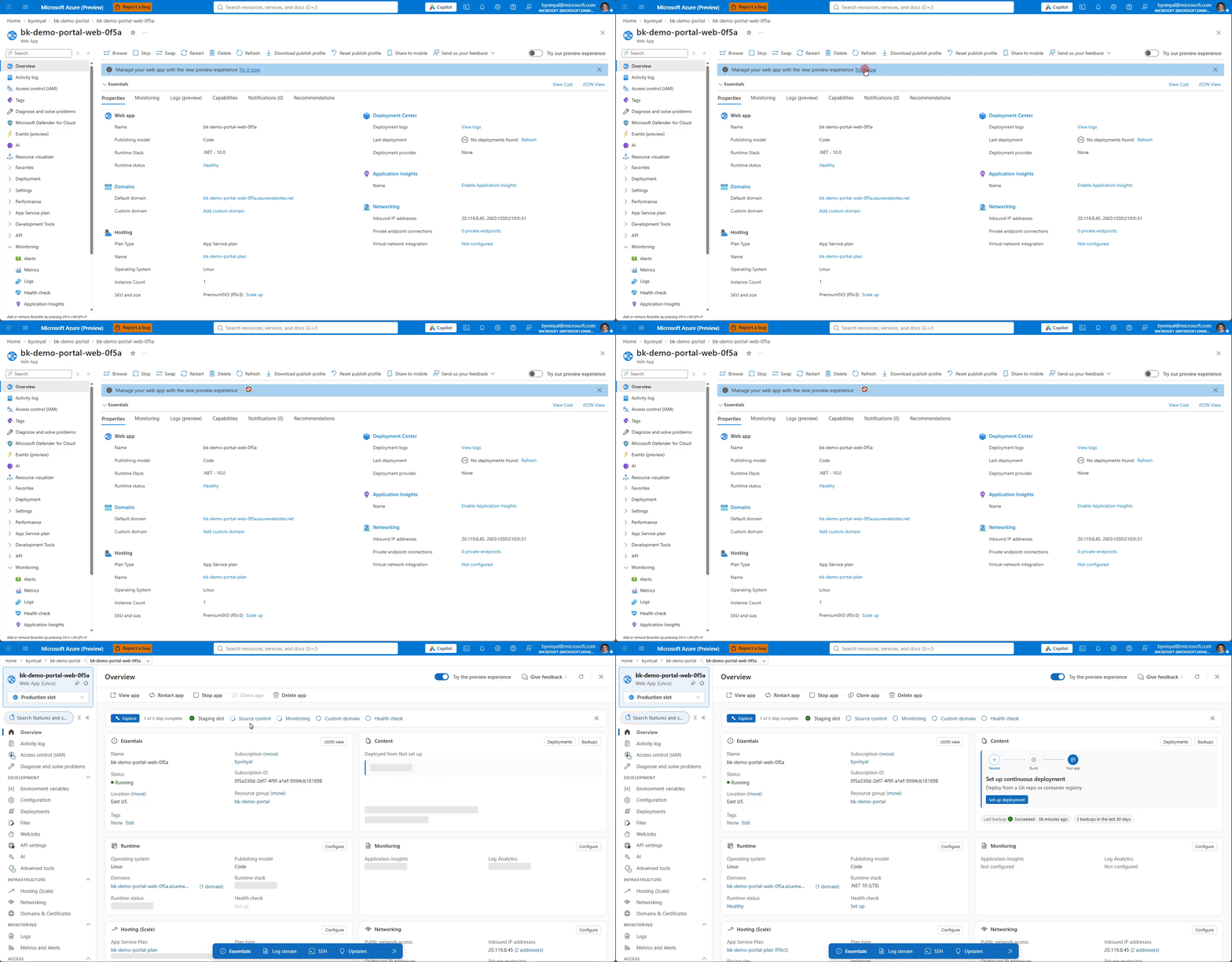
<p><img src="/media/2026/11/app-service-portal-preview-banner.gif" alt="Animated preview of the banner offering a link to try the refreshed App Service portal experience" /></p>

<p><em>Example preview banner. Availability varies during the phased rollout.</em></p>

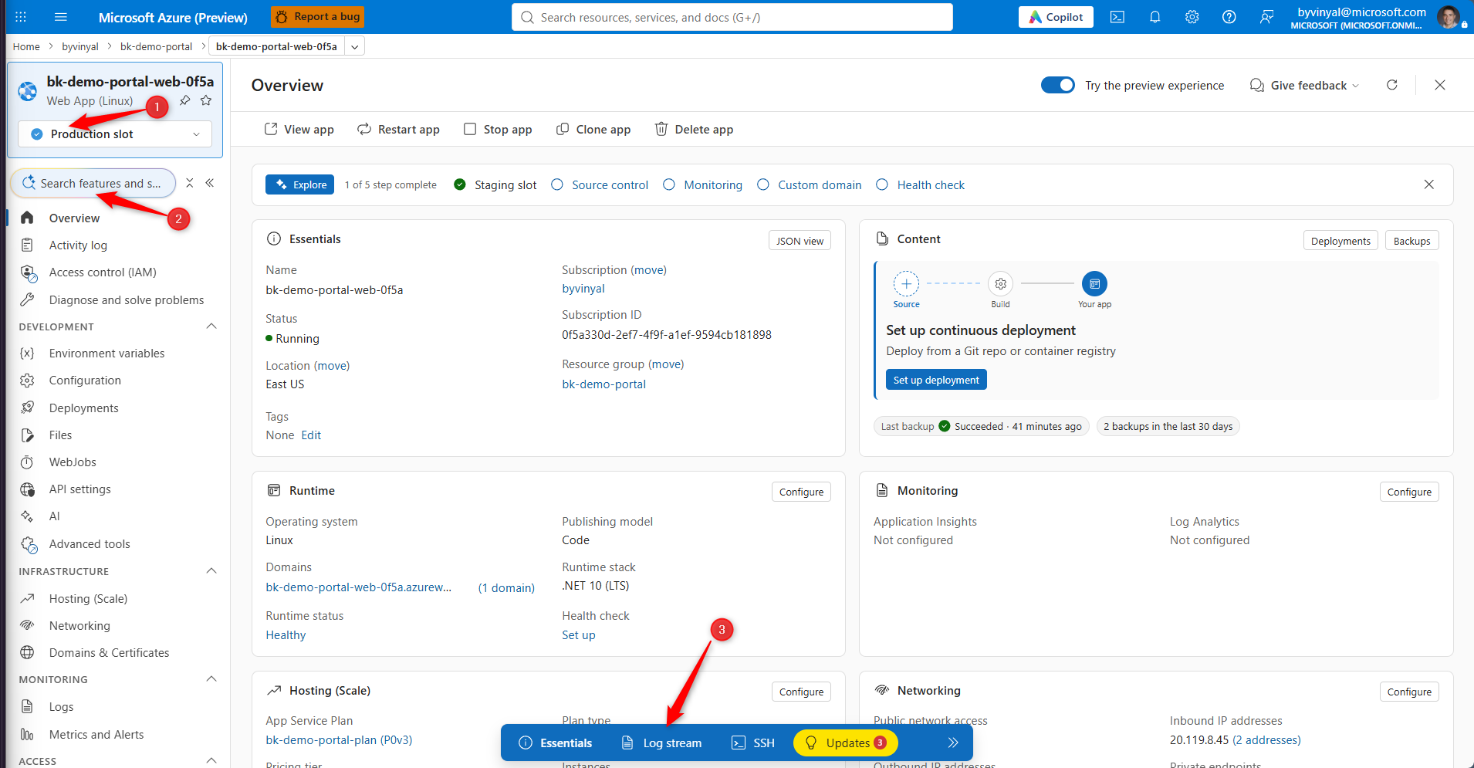
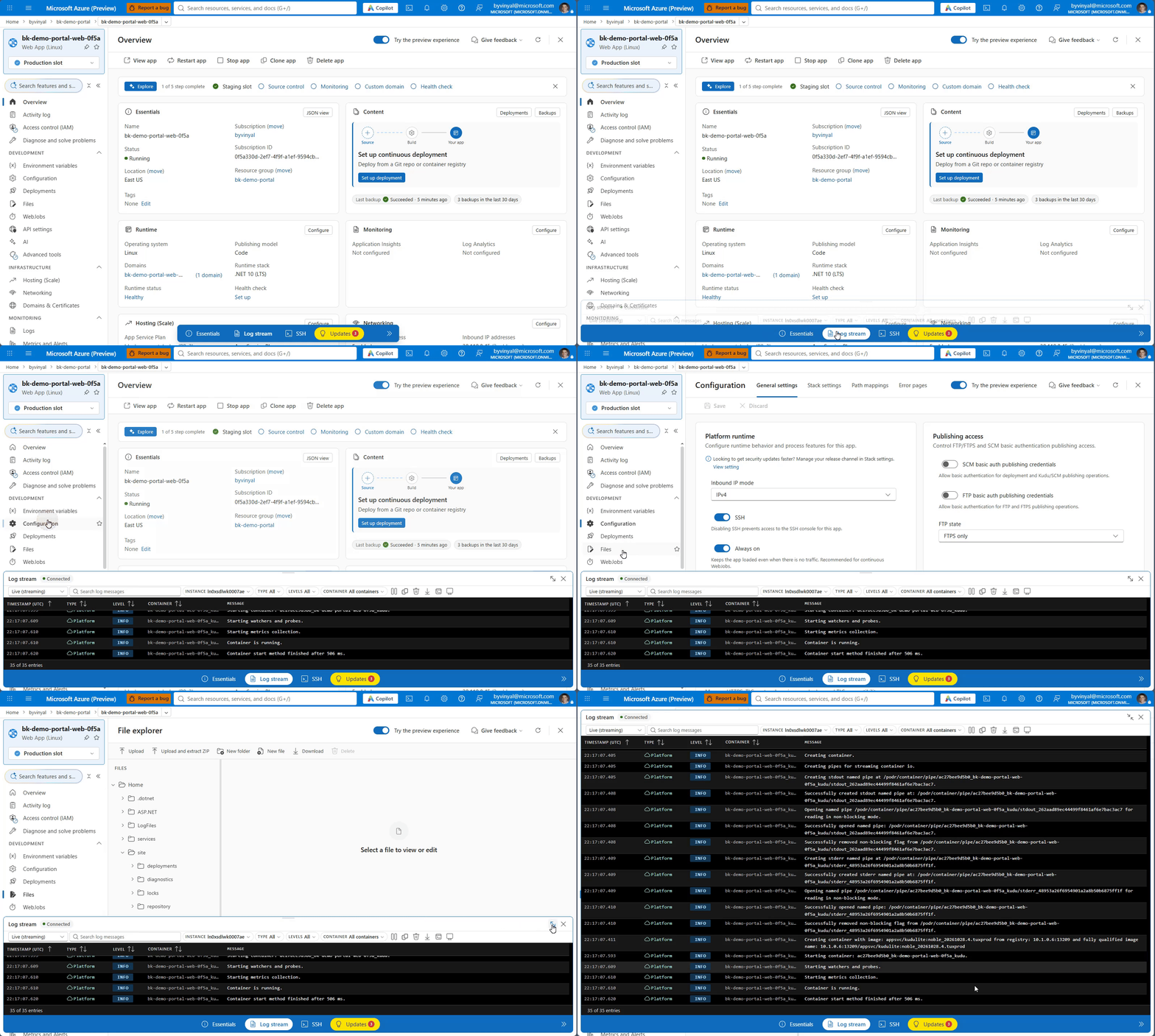
<p>Here is a first look at four of the changes: a (1) new deployment slot selector, (2) search across settings and troubleshooting tools, (3) log streaming alongside your current task, and a simplified app creation experience.</p>

<p><img src="/media/2026/11/app-service-portal-overview.png" alt="Refreshed App Service Overview page with deployment slot navigation, status cards, and the toolbelt" /></p>

<h2 id="move-between-deployment-slots-more-easily">Move between deployment slots more easily</h2>

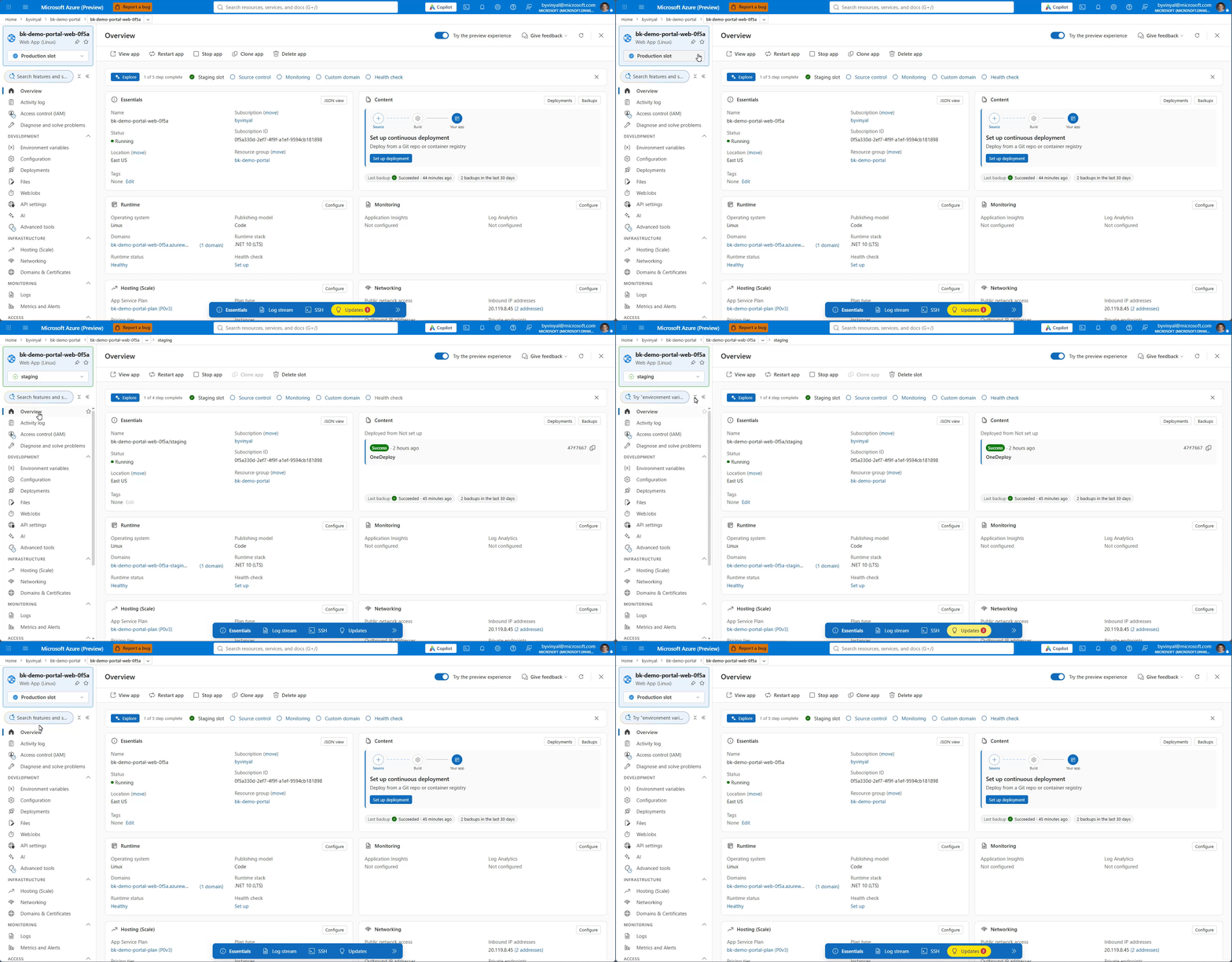
<p>Deployment slots let you work with separate instances of your app, such as a staging slot and production. Navigating between them should not interrupt what you are doing.</p>

<p>The refreshed experience introduces a <strong>slots dropdown</strong>. Select the slot you want to manage directly from the dropdown rather than navigating through nested portal blades.</p>

<p>This makes switching context more straightforward when you are reviewing a staging deployment or moving between slots during troubleshooting.</p>

<p><img src="/media/2026/11/app-service-portal-slot-selector.gif" alt="Deployment slots dropdown with production and staging slots, plus options to add a slot, swap, or adjust traffic" /></p>

<h2 id="find-settings-and-troubleshooting-tools-with-global-search">Find settings and troubleshooting tools with Global search</h2>

<p>You should not need to remember where every feature lives in the navigation menu.</p>

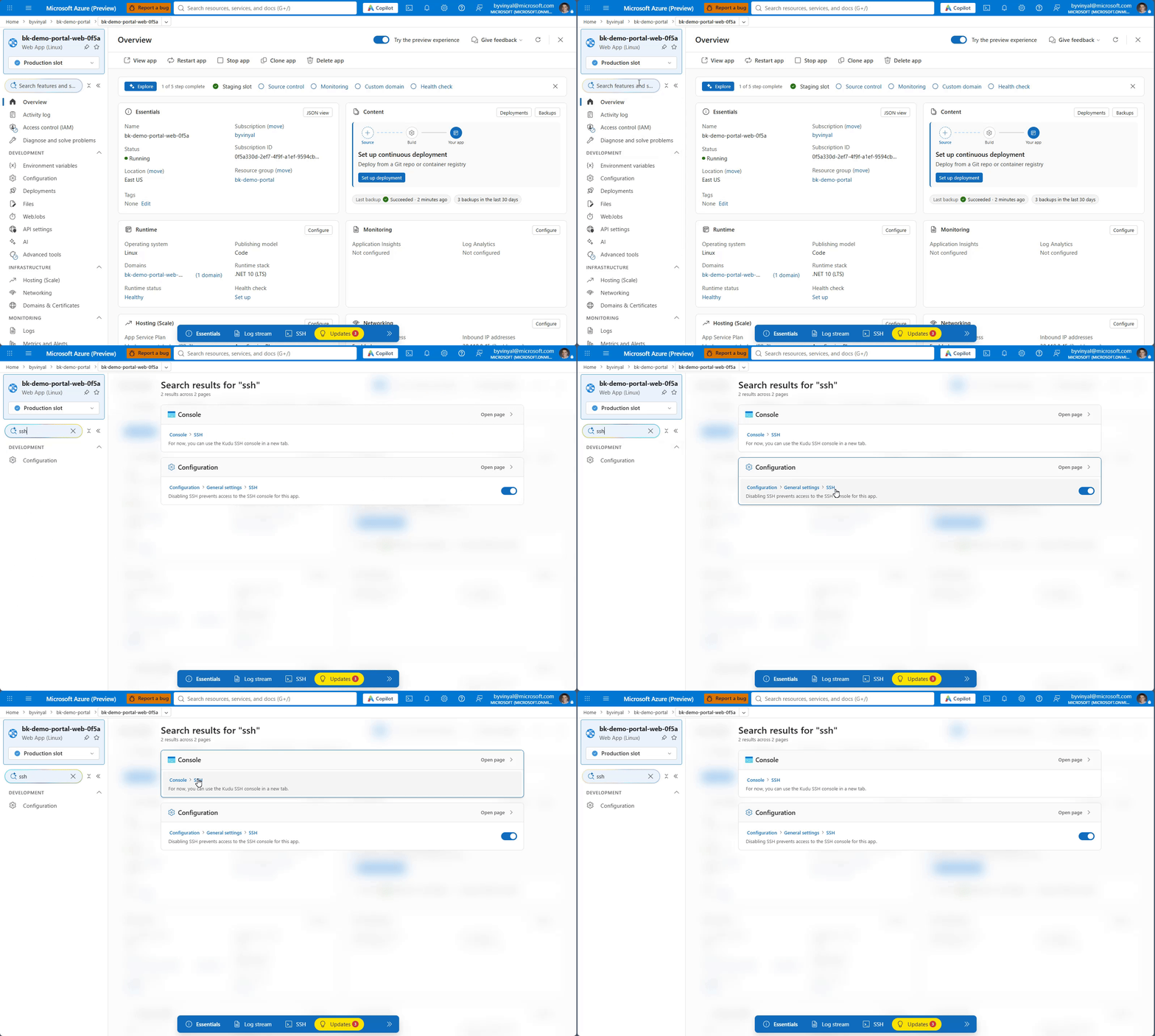
<p><strong>Global search</strong>, available in the left navigation, helps you find settings, features, and diagnostic detectors from one place. Whether you know exactly which setting you need or are looking for a troubleshooting tool, search provides another way to reach it without browsing through individual pages.</p>

<p><img src="/media/2026/11/app-service-portal-global-search.gif" alt="Searching for SSH from the left navigation, with results for the SSH console and configuration setting" /></p>

<h2 id="keep-logs-in-view-without-leaving-your-task">Keep logs in view without leaving your task</h2>

<p>Logs provide useful context when you are investigating an application issue. Switching away from the page you are working on just to open them can break your flow.</p>

<p>The toolbelt also provides access to <strong>Log stream</strong>, so you can view logs without leaving your current task. Keep the relevant portal page open while checking log output, rather than moving back and forth between separate views.</p>

<p>Together, Global search and Log stream put frequently used tools closer to the work you are already doing.</p>

<p><img src="/media/2026/11/app-service-portal-log-stream.gif" alt="Log stream showing live messages below the Configuration page while navigating the App Service portal" /></p>

<h2 id="a-simpler-starting-point-for-new-web-apps">A simpler starting point for new web apps</h2>

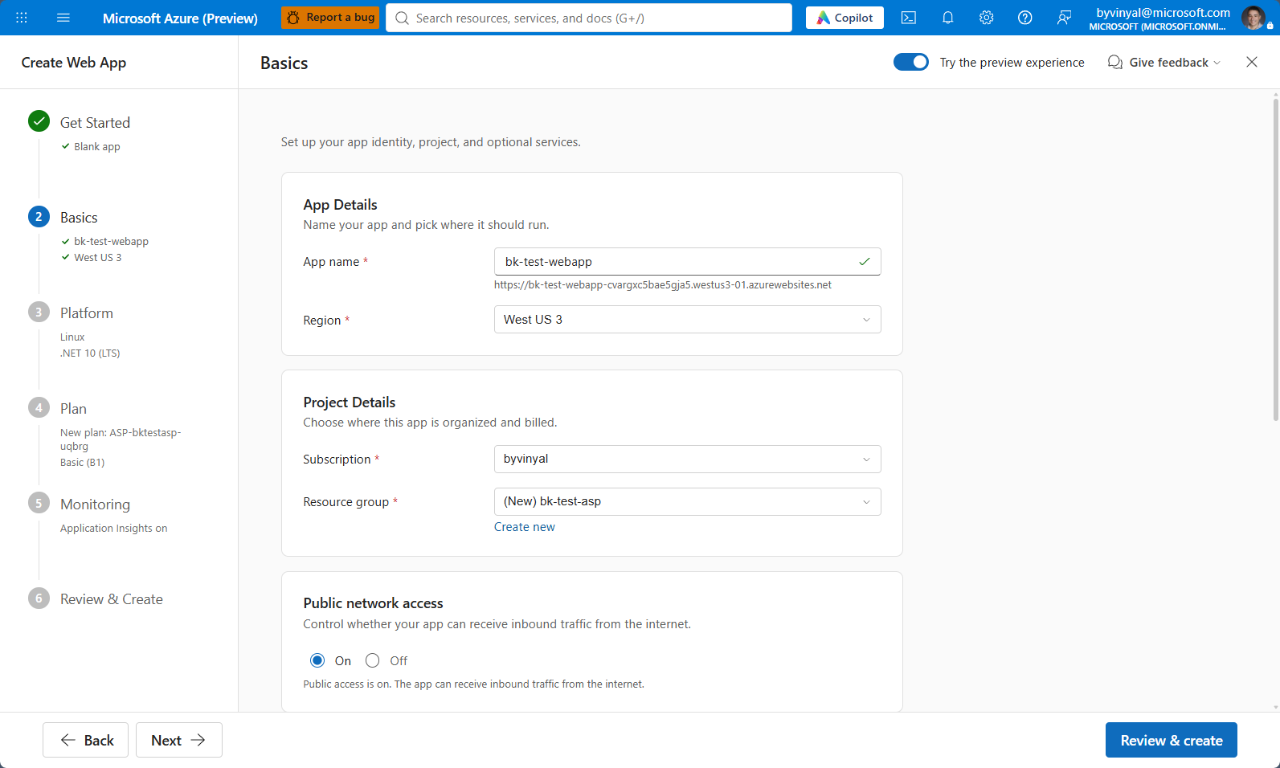
<p>The refresh also includes a <strong>simplified app creation experience</strong>, with a fresh approach to getting started with App Service.</p>

<p>The goal is to make the first steps more approachable, alongside the improvements to managing and troubleshooting an existing app.</p>

<p><img src="/media/2026/11/app-service-portal-create-web-app.png" alt="Create Web App Basics page showing app name, region, subscription, resource group, and public network access settings alongside the creation steps" /></p>

<h2 id="help-shape-the-experience">Help shape the experience</h2>

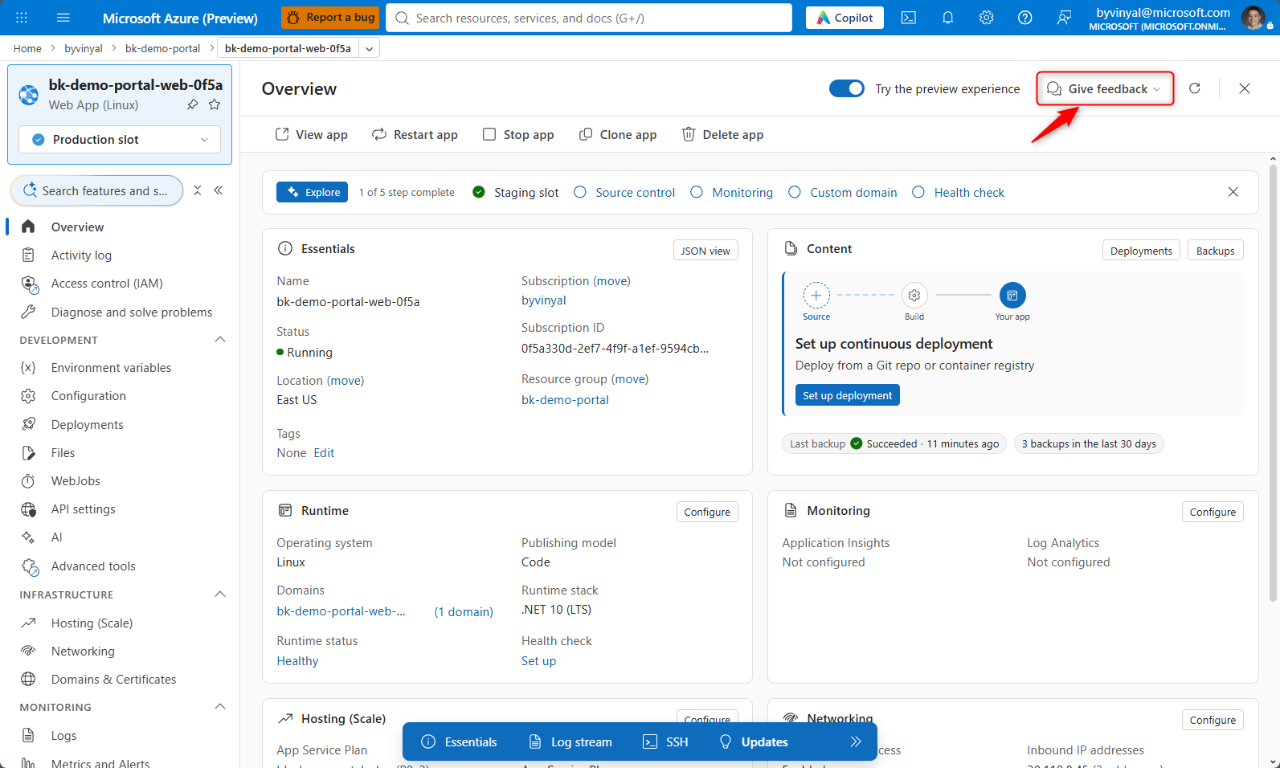
<p>Feedback helps identify confusing workflows and areas that need more attention. Select <strong>Give feedback</strong> in the upper-right corner of the App Service page, next to <strong>Try the preview experience</strong>, to share feedback on the refreshed experience.</p>

<p><img src="/media/2026/11/app-service-portal-feedback.png" alt="App Service Overview page with Give feedback highlighted in the upper-right corner next to Try the preview experience" /></p>

<p>Useful feedback includes what you were trying to do, what you expected to happen, and what happened instead. Do not include credentials, secrets, or sensitive application data.</p>]]></content><author><name>Azure App Service</name></author><summary type="html"><![CDATA[Managing a web app often means moving between deployment slots, finding a setting, and checking logs while investigating an issue. A refreshed Azure App Service portal experience focuses on making those everyday tasks easier, with more direct navigation and tools that stay within reach as you work.]]></summary></entry></feed>